




You assume the app handles your photo. It does — each one differently.
A photo taken with the Camera app, Location Services on (the iPhone default), carries photo location metadata: the GPS coordinates of where you stood, baked into the file's EXIF.[1] Sharing the photo doesn't leak that. Which app you share it through does.
Most apps strip it. Instagram, Facebook, Twitter/X, Naver, and Discord all remove the EXIF GPS from the file other people download.[2][3] But "strips" isn't "protects" — to strip your location, the app first had to receive the original, GPS and all. You're shielded from the crowd, not from the platform.
One app keeps it, in full: iMessage. A blue-bubble photo arrives with its original GPS intact.[4]
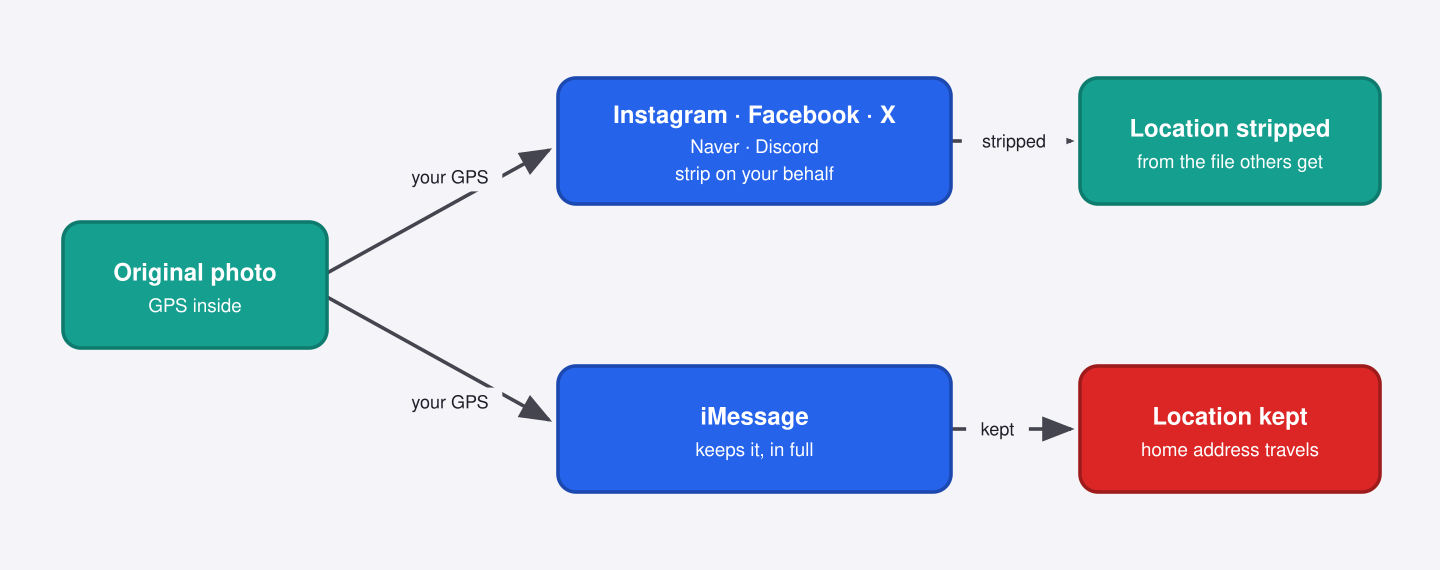
That location goes to the contact you chose — so the risk is amplification. The photo gets forwarded, dropped into a group chat, or the recipient's device is later compromised, and your home address rides along with it.
Right instinct, specific risk. The per-share fix is real but partial: in the share sheet, tap Options and turn Location off. It drops the GPS, leaves the timestamp and camera details behind, and doesn't persist.
The durable fix is at the source: Settings → Privacy → Location Services → Camera → Never.
Nothing on screen tells you which app kept it — so which have you been trusting with your address?
References
- Apple Support — Manage location metadata in Photos: https://support.apple.com/guide/personal-safety/manage-location-metadata-in-photos-ips0d7a5df82/web
- Velog (mikio) — exiftool per-app EXIF test (Instagram / Naver / Discord): https://velog.io/@mikio/exiftoooool
- AboutThisImage — How social media handles your photo metadata (Facebook / Twitter–X strip GPS from downloaded copies): https://aboutthisimage.com/social-media-metadata
- Sammapix — Does iMessage strip EXIF metadata?: https://www.sammapix.com/blog/does-imessage-strip-exif-metadata
 Instagram