




Every major email provider claims your mail is encrypted. We went down the rabbit hole to find out what that really means. We tested to six mailboxes that are popular in Korea: Gmail, Outlook, iCloud, Naver, Daum and Kakao.
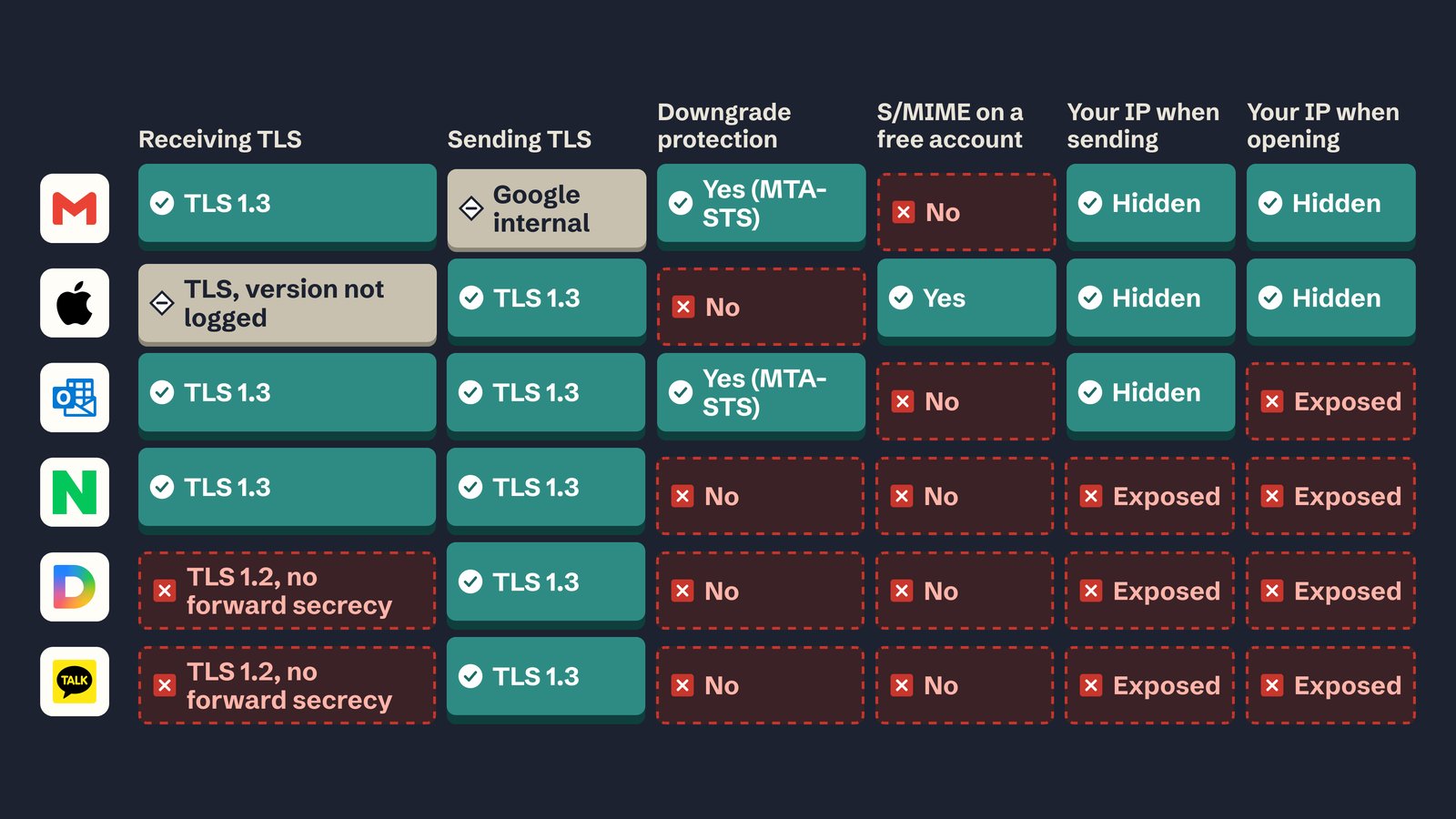
All six used TLS, but only two protect it against a TLS downgrade attack.
Only one supports S/MIME on a free account.
What's worse: three of them put your IP address in every email you send!
In this post, we explain what are the two main types of email encryption, how we tested each mailbox, and how each one faired.
Two kinds of email encryption
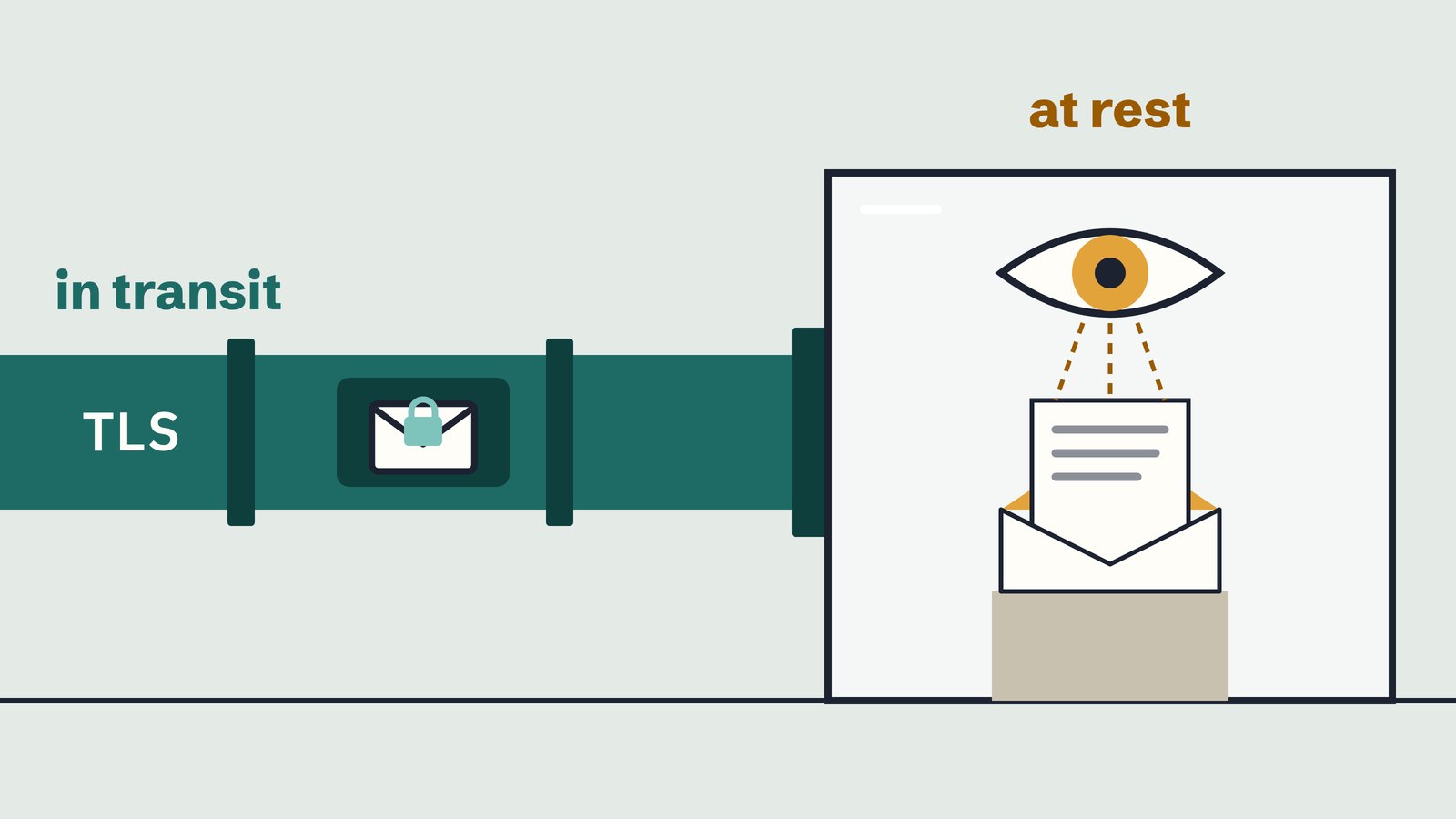
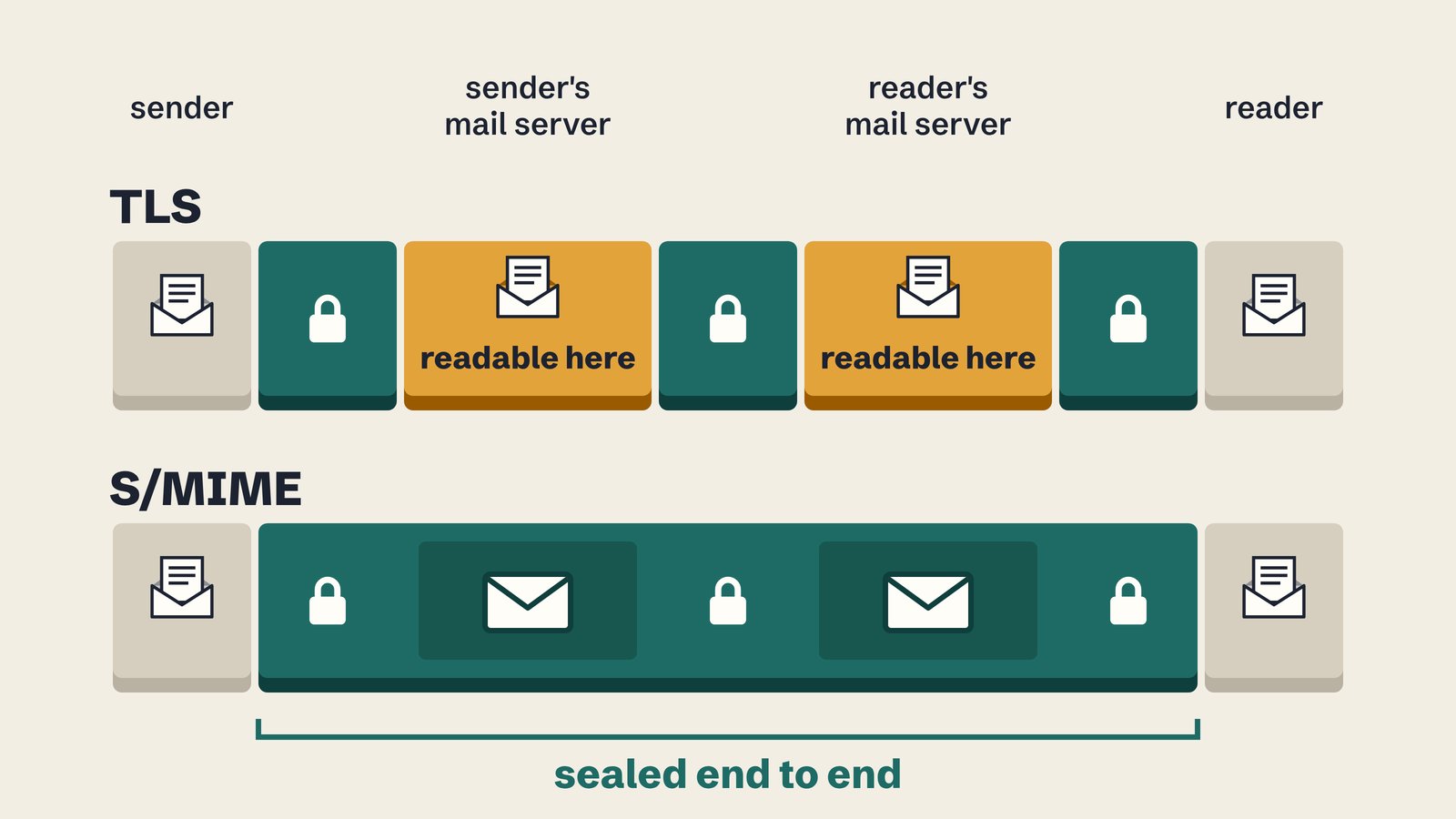
Transport encryption (TLS) protects a message while it travels from one mail server to the next. Each server decrypts it on arrival, so both the sender and receiver can read your cleartext mail message.
End-to-end encryption protects the message itself. A widely supported standard for it is S/MIME. The sender encrypts the message with the reader's public certificate. The only way to decrypt the message is using the reader's private key, which is usually kept in the reader's own device.
S/MIME can also be used to sign a message. A signature is used to prove who sent it and that nobody changed it in transit.
How we tested
- We sent 12 messages through Amazon SES: one S/MIME-signed and one S/MIME-encrypted message to each mailbox.
- The certificates came from a test certificate authority we created. No device trusts it, so a mailbox that checks signatures should warn about the signer. That is intended.
- We sent one email from each account to our own Google Workspace address, to see how each provider encrypts the mail it sends and what its headers reveal about the sender.
- We read each provider's MTA-STS and DANE records, which are the mechanism used to tell other servers that encryption is mandatory.
Most mail servers record the TLS version they used in the message headers. We use these headers as evidence in the next section.
Between servers: Daum and Kakao lag behind
| Mailbox | Receiving | Sending |
|---|---|---|
| Gmail | TLS 1.3 | Google internal |
| Outlook | TLS 1.3 | TLS 1.3 |
| iCloud | TLS, version not recorded | TLS 1.3 |
| Naver | TLS 1.3 | TLS 1.3 |
| Daum | TLS 1.2, no forward secrecy | TLS 1.3 |
| Kakao | TLS 1.2, no forward secrecy | TLS 1.3 |
It appears that Daum and Kakao receive mail with the same mail system, as
induced from their shared header mentioning Hanmail.
Our messages reached Daum and Kakao over TLS 1.2 with the cipher
TLS_RSA_WITH_AES_128_CBC_SHA256. This cipher is known to have no forward
secrecy: anyone who records the traffic today and obtains the server's private
key later can decrypt every recording. TLS
1.3 removed it for that reason:
RFC 8446 §1.2: "Static RSA and Diffie-Hellman cipher suites have been removed; all public-key based key exchange mechanisms now provide forward secrecy."
The same sender reached Gmail, Outlook and Naver over TLS 1.3, so the older cipher came from the Daum side. Daum and Kakao also send their own mail with TLS 1.3, so only the receiving servers seem to be behind.
MTA-STS prevalence: only Gmail and Outlook stop a TLS downgrade
Encryption between mail servers is opportunistic by default. An attacker on the network path can delete the receiving server's offer of TLS, and the sending server then delivers in plaintext without an error.
Two standards let a provider prevent this downgrade attack:
- MTA-STS publishes a policy over HTTPS that tells senders to refuse delivery when they cannot get a valid TLS connection.
- DANE publishes the mail server's certificate in DNSSEC-signed DNS, as a TLSA record.
We read both records for every mail server of each provider:
| Mailbox | MTA-STS | DANE | Protected against downgrade |
|---|---|---|---|
| Gmail | Enforce | None | Yes |
| Outlook | Enforce | None | Yes |
| iCloud | None | None | No |
| Naver | None | None | No |
| Daum | None | None | No |
| Kakao | None | None | No |
None of the six publishes DANE. Gmail and Outlook enforce TLS using a proper MTA-STS policy.
Since iCloud, Naver, Daum or Kakao do not publish an MTA-STS policy, mail to these providers can be forced into plaintext by anyone who controls a network path to their mail servers.
S/MIME on a free account: only iCloud
We downloaded the original of every S/MIME message and verified it with OpenSSL. All six providers delivered the signatures and the encrypted content intact.
However, support for S/MIME on a free account is almost unexistent.
| Mailbox | S/MIME on a free account |
|---|---|
| iCloud | Yes: iCloud Mail checks signatures, and Apple Mail decrypts with an installed certificate |
| Outlook | No: Outlook on the web offers it to work or school accounts |
| Gmail | No: Google offers it on Workspace Enterprise Plus, Frontline Plus and Education editions |
| Naver, Daum, Kakao | No: the signature shows as an smime.p7s attachment, the encrypted message as smime.p7m |
No Privacy: Naver, Daum and Kakao expose your IP address
The email we sent from Naver carries an X-Originating-IP header with the
public IP address of the computer we sent it from. Daum and Kakao put the same
address in an X-Originating-IP header and in their first Received header:
Received: from 220.64.108.39 ([203.0.***.***]) by skadi-sender ...
X-Originating-IP: [203.0.***.***]
In the example above, we redacted our IP address, but it is sent in full by the providers.
An IP address can potentially be used to identify the sender's ASN, local network and even approximate location.
The Gmail and Outlook headers show only the provider's own servers. We sent the iCloud email from the iPhone Mail app, and its headers show an Apple address.
I need to send a private message, what should I do?
S/MIME is a feature of the mail client. The key lives on your device, so a client that supports S/MIME can decrypt mail from any provider, including Naver and Daum over IMAP.
- Use a mail client that supports S/MIME. Examples: Apple Mail on iPhone and Mac, Thunderbird, Proton, Outlook with a Microsoft 365 work account or Google paid plans.
- For Google Workspace: S/MIME needs Enterprise Plus, Frontline Plus or an Education edition, and it is hosted: the private key is uploaded to Gmail.
- Use a mail client that supports PGP.
- Encrypt the sensitive part of the message manually using PGP. You can add the pgp-encrypted cyphertext as an attachment file or in the message body.
- Otherwise, keep sensitive content out of the mail body. Your provider can read every message that was not encrypted end to end.
Have you ever received an email with an smime.p7s attachment and wondered what
it was?
References
- IETF — RFC 8551: Secure/Multipurpose Internet Mail Extensions (S/MIME) Version 4.0 Message Specification (April 2019)
- IETF — RFC 7672: SMTP Security via Opportunistic DNS-Based Authentication of Named Entities (DANE) Transport Layer Security (TLS) (October 2015)
- IETF — RFC 8446: The Transport Layer Security (TLS) Protocol Version 1.3 (August 2018)
- Google Workspace Admin Help — Turn on hosted S/MIME for message encryption
- Google Workspace Admin Help — Hosted S/MIME FAQ
- Microsoft Support — Set up Outlook to use S/MIME encryption
- Apple Support — Use S/MIME to send and receive encrypted messages in the Mail app in iOS
- Panke — MTA-STS Policies in Practice (22 September 2026)
- Panke — S/MIME and TLS test of six mailboxes (first-party measurement, 23 September 2026)

 Instagram