




Out of 171,510 websites serving an HTTPS certificate in Korea, 19% fail standard certificate verification.
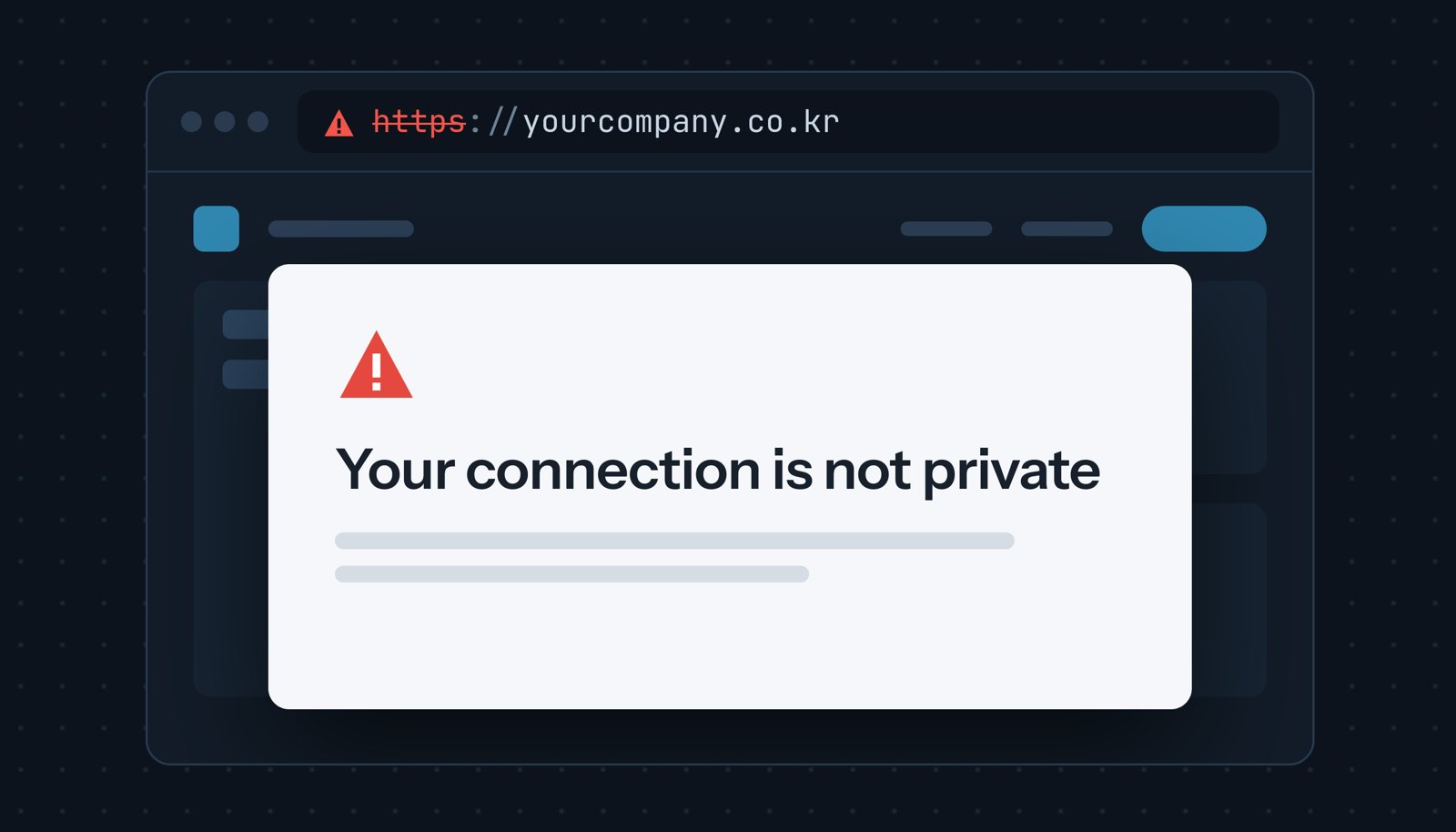
Visitors following an https:// link to these sites encounter a "YOUR
CONNECTION IS NOT PRIVATE" error.
We categorized each failure by cause and found that most stem from a few common configuration errors that site owners can diagnose with two commands and easily fix.
How we measured
We probed 211,126 Korean domains by initiating a single TLS handshake on port
443 for both the bare domain and the www. subdomain without sending a page
request.
In the analysis below, a domain is said to be trusted if either hostname
passed verification (with or without the www. prefix).
A total of 171,510 domains served a certificate.
While 81% of domains passed verification, we found that 19% failed.
In this article, we focus on the failing domains.
No weak crypto
Across the trusted certificates, we found zero SHA-1 or MD5 signatures and zero RSA keys under 2,048 bits.
Weak cryptography appears almost exclusively on the untrusted side, concentrated in a single file type: 99% of the MD5 signatures we detected belong to unreplaced default certificates.
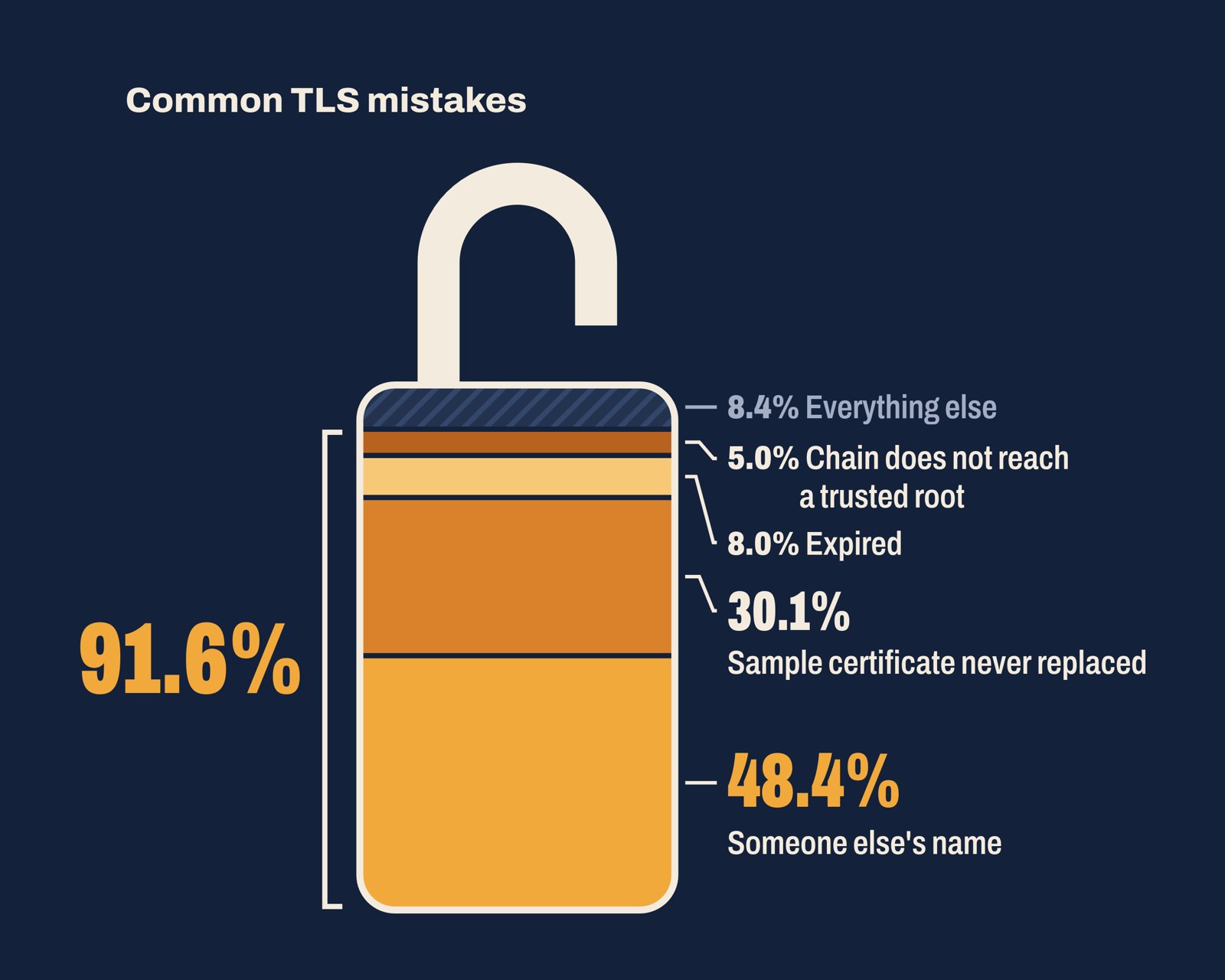
1. Common Name Mismatch
NET::ERR_CERT_COMMON_NAME_INVALID
Nearly half of the failing sites (48%) present a CA-issued certificate registered to the wrong domain name.
Almost half of those serve their hosting provider's wildcard certificate.
The most frequent hosting providers we found were gabia.com, cafe24.com, gabia.io, godomall.com, and anybuild.com.
When a shared server lacks a dedicated certificate for your domain, it defaults to its own. Our earlier post on shared hosting explains how this happens.
- E-commerce platforms issue certificates automatically: On Cafe24's shopping mall and NHN Commerce's 고도몰 (Godomall), certificates are free and automatically issued upon domain connection.
- Shared web hosting offers paid options: Cafe24 web hosting, Gabia, and Blueweb require an application and a fee, while Dothome charges 2,000 won per month as of writing.
2. Self-signed certs
NET::ERR_CERT_AUTHORITY_INVALID
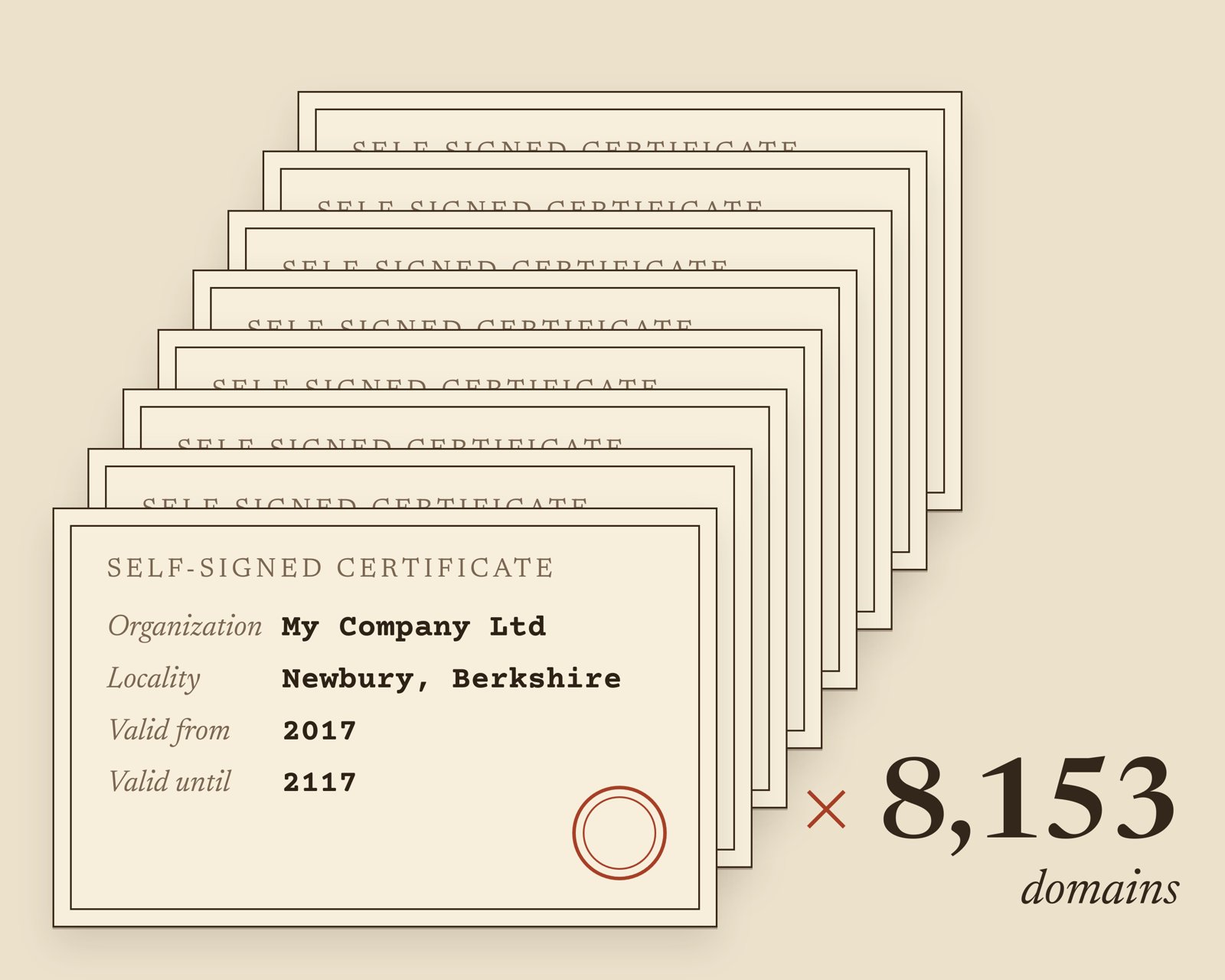
30% of the failing sites present self-signed placeholder certificates. A single file accounts for 83% of them, a quarter of all failing sites:
Subject:    C=GB, ST=Berkshire, L=Newbury, O=My Company Ltd
Issuer:     C=GB, ST=Berkshire, L=Newbury, O=My Company Ltd
Serial:     0
Signature:  md5WithRSAEncryption
Valid:      2017-04-13 to 2117-03-20
Newbury, Berkshire, and "My Company Ltd" are default placeholders from Red Hat's legacy OpenSSL prompts. Created on April 13, 2017, this exact default certificate was copied across roughly 1,087 server addresses.
Most of these sites (87%) remain functional as HTTP-only sites.
The exact behavior can vary, but usually when visitors type a domain, the
browser reaches the HTTP site and flags it as "Not secure" (주의 요함 in Korean
Chrome). Visitors trying to directly access https:// link encounter a
full-page warning.
Google announced in October 2025 that Chrome 154 would enable that setting by default. Chrome 154 reached the stable channel on September 22, 2026. With it active, Chrome prompts users for permission before accessing any public site without HTTPS.
- Install a real certificate: Every hosting provider listed in the previous section offers one.
- Stop serving port 443: There's no point in answering HTTPS requests if you have no valid certificate.
3. WWW Mismatch
19.3% of websites have an inconsistent setup between {domain}.com and
www.{domain}.com. Only one of them serves a valid certificate.
Tistory custom domains illustrate this pattern clearly: 465 domains present
Tistory's own *.tistory.com certificate, which expired on March 30, 2026. For
85% of those domains, the alternative hostname works: 75% function on the bare
domain but fail on www., while 10% show the reverse.
Tistory's FAQ explains why: "티스토리 보안 인증서는 발급 시 작성한 주소 1개만 허용합니다" (Tistory's security certificate allows only the single address specified at issuance).
Here's are some ways to fix this inconsistency:
- Cover both hostnames and redirect.
- Delete the unused DNS record.
4. Incomplete Certificate Chain
9% of the failing sites send a certificate chain that fails to resolve to a trusted root authority.
44% of those sites sent their own certificate alone; the remaining 56% included intermediate certificates that still failed to reach a trusted root.
Browsers frequently work around missing intermediates. Chrome and Safari fetch missing intermediates automatically, while desktop Firefox preloads known intermediate certificates. Consequently, standard desktop browser visitors rarely see warnings.
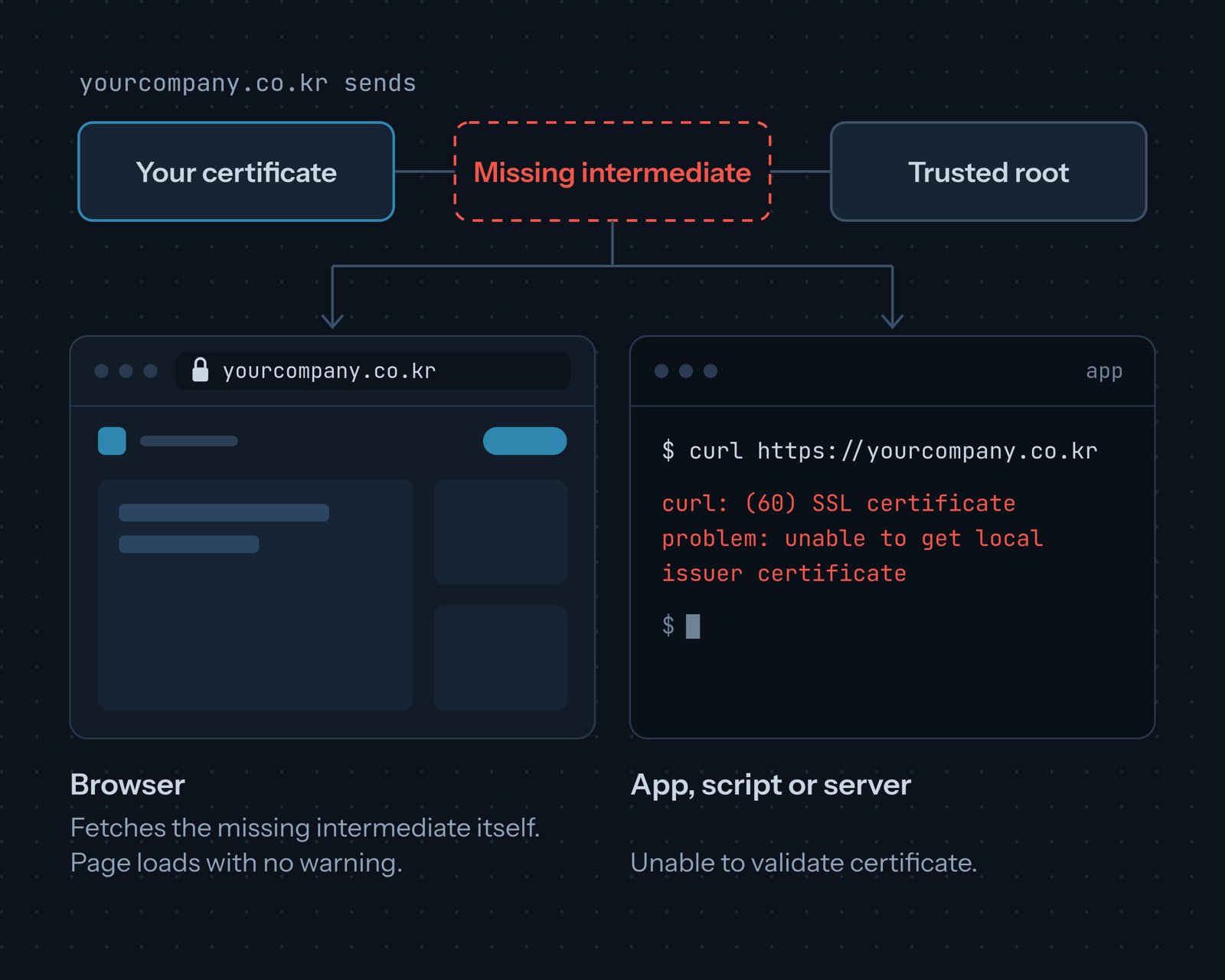
However, non-browser clients rarely repair broken chains. As the curl FAQ explains, "the verification works in your favorite browser but fails in curl." Python scripts, Java applications, and Android apps fail too.
Quick fix:
- Serve the complete certificate chain! Configure your server to send the full chain file provided by your CA, containing your certificate followed by all intermediate certificates.
5. Expired Certificate
NET::ERR_CERT_DATE_INVALID
21% of the failing sites serve an expired certificate. Among those, 42% of the certificates expired in 2026, while the oldest expired in 2013.
Manual renewal is about to become significantly harder.
The CA/Browser Forum's Ballot SC-081, proposed by Apple, reduces maximum certificate validity to 200 days for certificates issued after March 15, 2026. This limit drops to 100 days starting March 15, 2027, and to 47 days starting March 15, 2029.
How to keep up with shorter expiration timelines:
- Automate certificate renewal (best option): Use your hosting provider's automated option or deploy an ACME client like Certbot.
- Monitor expiration dates independently: Set up expiration alerts to the team responsible for replacing them.
How to Check Your Own Site
We recommend repeating the commands below for the bare domain and once for the
www. domain, just to be sure.
These commands use the openssl CLI tool.
For a web-based alternative, we recommend SSL Labs.
The first command returns a verdict:
openssl s_client -connect example.com:443 -servername example.com \
  -verify_hostname example.com </dev/null 2>/dev/null | grep 'Verify return code'
How to interpret the results:
0 (ok): The domain is valid and working.- No output: The domain does not answer TLS handshakes on port 443.
62 (hostname mismatch): Certificate hostname mismatch.10 (certificate has expired): Expired certificate (which may also have a hostname mismatch).20or21: The certificate chain does not reach a trusted root.18 (self-signed certificate): A self-signed certificate issued for your domain name.
Next, use this command to display the certificate's details and isolate the root cause of an issue:
openssl s_client -connect example.com:443 -servername example.com </dev/null 2>/dev/null \
  | openssl x509 -noout -subject -issuer -dates -ext subjectAltName
If your domain appears in neither the subject nor the list of alternative names
(subjectAltName), validation will fail.
References
- Panke — SNI Case Study: 730 Misconfigured Domains (29 September 2026)
- Cafe24 — SSL 인증서는 어떻게 신청하나요? (How do I apply for an SSL certificate?), shopping mall help, article 921
- NHN Commerce — SSL 보안서버 관리 (SSL secure server management), Godomall help
- Cafe24 — SSL 인증서 신청 FAQ (SSL certificate application FAQ)
- Blueweb — SSL 신청 절차 (SSL application process)
- Dothome — SSL 가격 (SSL prices)
- Red Hat — Red Hat Enterprise Linux 4 System Administration Guide, 25.8. Creating a Self-Signed Certificate
- Google Security Blog — HTTPS by default (28 October 2025)
- Tistory — SSL 전면 적용 관련 FAQ (FAQ on applying SSL everywhere) (16 January 2019)
- Gabia — 고객센터 호스팅 매뉴얼 (customer centre hosting manual), 437/1961
- Mozilla Security Blog — Preloading Intermediate CA Certificates into Firefox (13 November 2020)
- Apple — SecTrustSetNetworkFetchAllowed(::)
- Chromium — net/cert/cert_verify_proc_builtin.cc
- curl — Frequently Asked Questions
- Oracle — Java PKI Programmer's Guide (Java SE 21)
- Android Developers — Security with network protocols
- Chromium — components/ssl_errors_strings.grdp
- CA/Browser Forum — Ballot SC081v3: Introduce Schedule of Reducing Validity and Data Reuse Periods (11 April 2025)
- Qualys — SSL Server Test

 Instagram