




We’ve all done it: you join an office or coffee shop "Guest" network, assuming you're safely marooned on your own private island, miles away from anyone else's laptop or the internal company servers. That sense of security relies almost entirely on a setting called "client isolation."
Unfortunately, that feeling of safety is mostly an illusion.
In February 2026, researchers released a landmark study called AirSnitch at the NDSS Symposium. They tested client isolation across a huge range of routers and networks—and every single one of them fell to at least one attack. The problem isn't just buggy vendor code; it's that "client isolation" was built on a foundation of guesswork. Here is how it breaks down and why it matters to you.
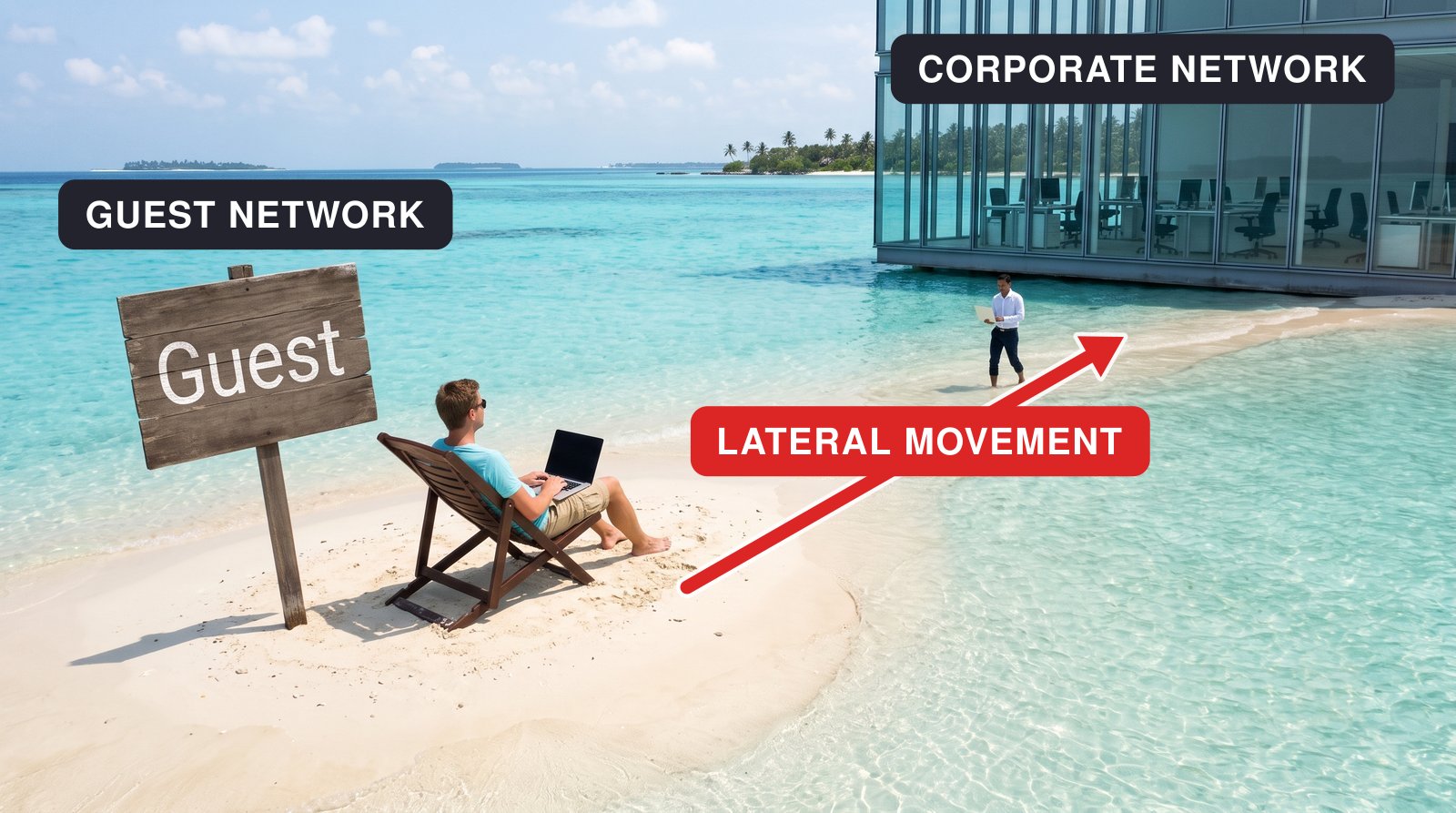
1. The Core Problem: "Client Isolation" Isn't an Official Standard
The Point: Because there is no official industry standard for client isolation, every vendor just makes up their own rules—leaving massive security gaps across the board.
If you ask a network engineer to show you the IEEE standard definition for "client isolation," they won't be able to. The official IEEE 802.11 specifications define handshakes, encryption hierarchies, and frame formats, but they say nothing about keeping two connected users from talking to each other.
As the team behind AirSnitch pointed out, client isolation is "not a properly standardized feature of the IEEE 802.11 standards."
Because every hardware vendor had to invent their own version of the feature from scratch, protection varies wildly from router to router. Worse, almost all of these implementations share three fundamental blind spots that let attackers reach your device anyway.
2. Gap #1: Broadcast Traffic Completely Bypasses Isolation
The Point: Even if you have your own unique session password, shared broadcast keys allow bad actors to send malicious traffic straight to your machine.
You might assume that modern Wi-Fi encryption (like WPA3 or Enterprise logins) protects you because your session uses a unique key. While that's true for your private traffic, networks still need a way to send messages to everyone at once (multicast and broadcast traffic).
To make this work, the router hands out a single, shared Group Temporal Key (GTK) to every single device on the network.
Client isolation usually forgets about this shared key. An attacker sitting on the same guest network can craft a group-addressed packet using that shared key, bypass the access point's isolation filters, and deliver malicious payloads directly to your laptop.
AirSnitch, NDSS 2026: Wi-Fi client isolation in single-BSSID networks, such as home and small-office networks, is "fundamentally broken for all WPA versions."
3. Gap #2: Routers Are Tricked by "Gateway Bouncing"
The Point: Client isolation only watches the Wi-Fi level (Layer 2). Attackers trick the router into forwarding malicious traffic at the network level (Layer 3).
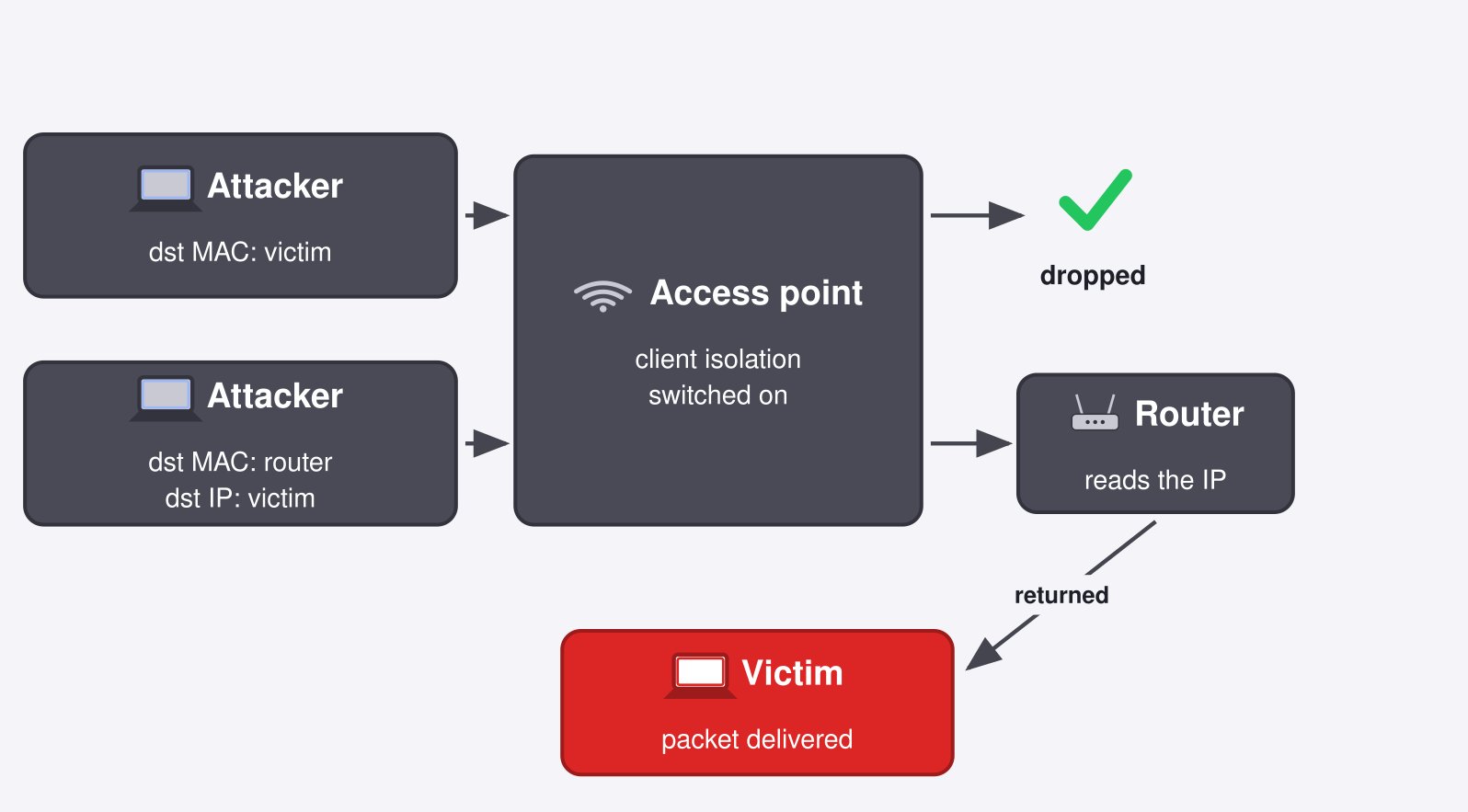
Most client isolation checks work at Layer 2 (the MAC address level). The access point looks at incoming traffic, sees a frame addressed directly to another client's MAC address, and blocks it. Simple, right?
Except attackers easily bypass this using a trick called gateway bouncing:
- The attacker creates a packet targeting your IP address.
- Instead of using your MAC address, the attacker addresses the packet to the router's MAC address.
- The access point sees a packet addressed to the router and thinks, "Oh, this is just regular web traffic going upstream!" and lets it pass.
- The router receives the packet, reads the destination IP, realizes the target machine is right there on its own local network, and dutifully hands the packet right down to you.
4. Gap #3: "Guest" and "Staff" Wi-Fi Share the Same Hardware
The Point: Putting guest and employee traffic on two different Wi-Fi names (SSIDs) on the same access point doesn't actually keep them separate.
It feels reassuring when an office broadcasts two separate Wi-Fi names—one for guests and one for staff. It looks like two networks, but under the hood, it's almost always just one physical router juggling two digital labels.
During real-world field tests on two university campuses, researchers connected to an open Guest SSID and were able to intercept traffic belonging to devices on the secure WPA2-Enterprise Staff SSID.
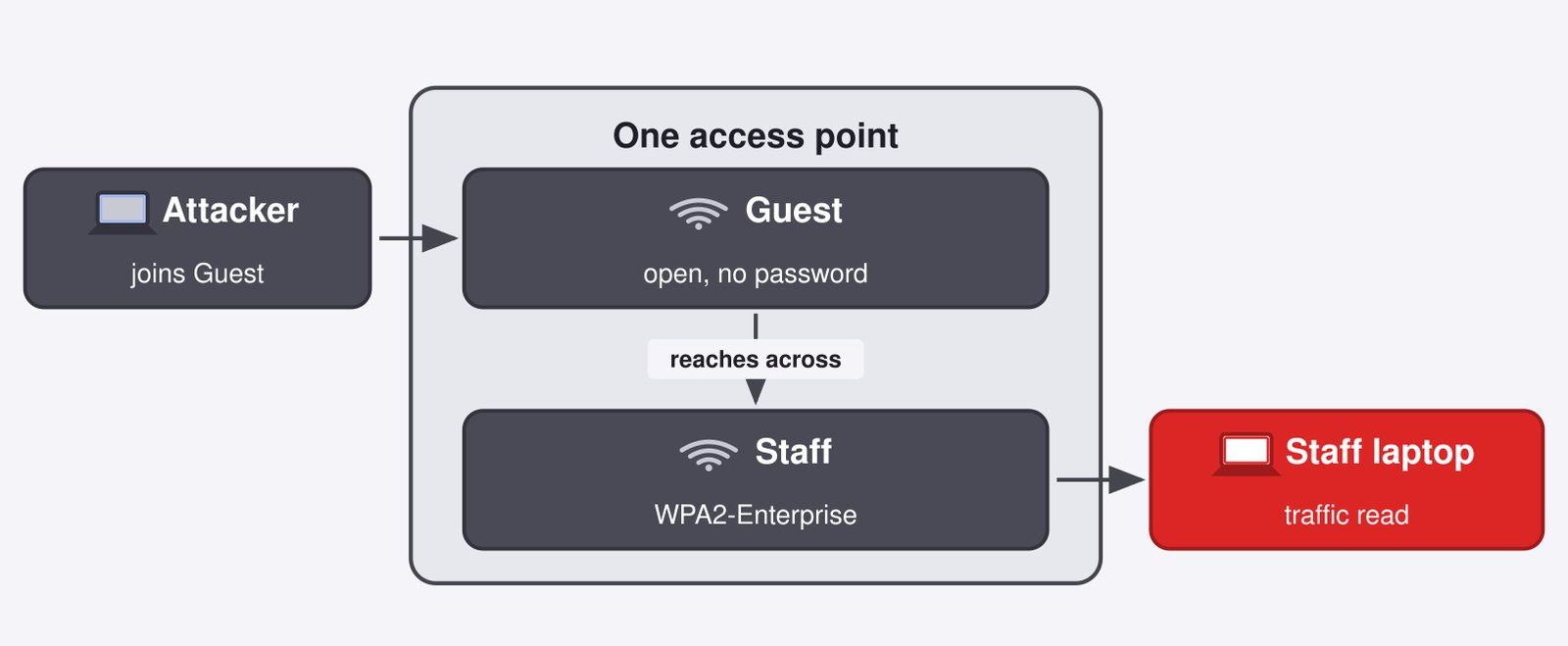
They didn't stop at user traffic, either. On an enterprise testbed, they intercepted internal authentication packets (RADIUS) passing between the access point and its backend server. By brute-forcing the shared password, they could spin up a fake server to trick legitimate staff devices into authenticating with them instead.
How to Fix It: Actionable Checklist for Network Admin
If you're managing an office network or just want to audit your own setup, simply toggling "Client Isolation" on your router isn't enough. Here is what you should actually do:
- Use True Hardware VLANs: Don't rely on software-based guest toggles. Assign the guest SSID to an isolated VLAN at the hardware level. In the AirSnitch tests, proper VLAN segmentation successfully blocked every single attack technique in the paper.
- Audit Your Network Regularly: Don't take isolation for granted. Run the researchers' open-source AirSnitch testing suite on your network after every firmware update to ensure no new leaks have formed.
- Update Router Firmware Immediately: Several hardware vendors released patches following the 90-day disclosure window. Make sure your access point hardware is running up-to-date firmware.
- Implement Device-to-Device Encryption: For sensitive corporate environments, deploy MACsec (IEEE 802.1AE) alongside WPA2/WPA3. This ensures that even if an attacker bypasses client isolation, your underlying data remains encrypted and unreadable.
When was the last time someone actually tested your office's guest Wi-Fi from the attacker's perspective, or is it just sitting there with the default settings turned on?
References
- Xin'an Zhou, Juefei Pu, Zhutian Liu, Zhiyun Qian, Zhaowei Tan, Srikanth V. Krishnamurthy, Mathy Vanhoef — AirSnitch: Demystifying and Breaking Client Isolation in Wi-Fi Networks, NDSS Symposium 2026 (University of California, Riverside; DistriNet, KU Leuven)
- AirSnitch measurement suite — github.com/vanhoefm/airsnitch
- Kaspersky — AirSnitch: attacking Wi-Fi client isolation and guest networks
- Wi-Fi Alliance — Wi-Fi CERTIFIED Passpoint
- IEEE — 802.1AE: MAC Security (MACsec)

 Instagram